


Hold onto your breath, as this is the right opportunity to get more traffic. Google recently announced how to optimize a site to receive more visitors from the Beta Discover Follow feature.

Recently, Google has opened the door of opportunities for its users by introducing the new documentation for a beta feature that allows you to follow a website on their Google Discover feed. After testing this feature since May 2021, Google has finally launched such a feature to the Google Search. While publishing an article now, the concerned individual can follow a website and see them in their Discover feed.
Contents
Optimize the Beta Discover Follow Feature
Users in the United States who use Chrome Android Beta, also known as Chrome Canary, can adopt this new feature. Though the Discover Follow Feature is indeed available to a particular set of users, it can turn into something beneficial to start the journey of obtaining loyal readers through Discover.
Publishers do not necessarily need to indulge themselves in activities to drag visitors. However, Google has urged the publishers to maintain an up-to-date RSS or Atom feed. This can help Google to recognize the new articles. Also, for communication for publishers, Google has inaugurated a method for them to communicate which feed can be used for following in Discover.
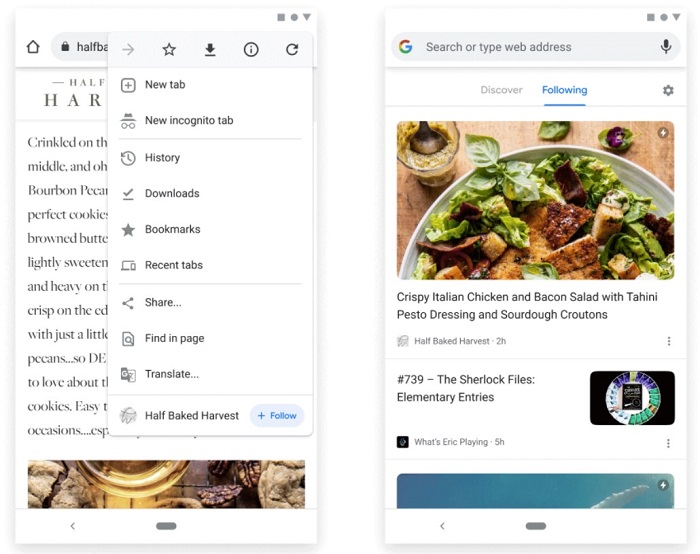
While operating, one must remember that the following feature uses RSS or Atom feeds on your website by default. With the unavailability of an RSS or Atom feed on your website. Google will take the responsibility to generate an automatic feed for your entire domain based on the view of your site. Also, if your website operates one or more feeds. You can choose to inform Google about the feed that you want the visitors to follow for a given page on your site. Hence choosing to optimize it.
Follow the Hub and Leaf Pages
Hub and leaf pages play a dominant role in this scenario as Google has asked to add the feed to these pages. In case you are new to these terms, let me introduce you. Category and archive pages classified as the main leading pages are the hubs. On the other hand, the individual articles that the hub links out to are known as the leaf pages.
The sites that consist of only one feed, the same feed can get into the head section of every page. A publisher can use this hub and leaf feed structure. Then designate a distinctive feed for different categories, including art and culture, business and technology, etc.
The Multiple Feed Pattern
The publishers even have the opportunity to specify the number of feeds that resemble various sections of the site to the home page. However, the rank of preference will be the judgmental factor for the position of those feeds.

For example, a website owner might prefer his visitors to follow the feed of the front page. Then, followed by the business and then the technological sector. Such an order of ranking helps Google grasp knowledge to comprehend the multiple sites prevalent on your site.
Beta Discover Follow Feature
This feature has not been made available to all Chrome users but do not miss the chance. Even a few can bring a change.
See also: Google: Increase Discover Traffic with Max Image Preview Tag